

Everything your architects will ask, answered on this page.
01 · Where it sits
Keep your network as it is. The gateway adds quantum-safe protection on top.
QPN is an overlay. It wraps quantum-safe encryption around the traffic routes you already have and leaves your infrastructure largely untouched. It encrypts at Layer 3, so everything above Layer 3 travels encrypted with it, and the encryption stays transparent to your data traffic and to Layer 3 and up.
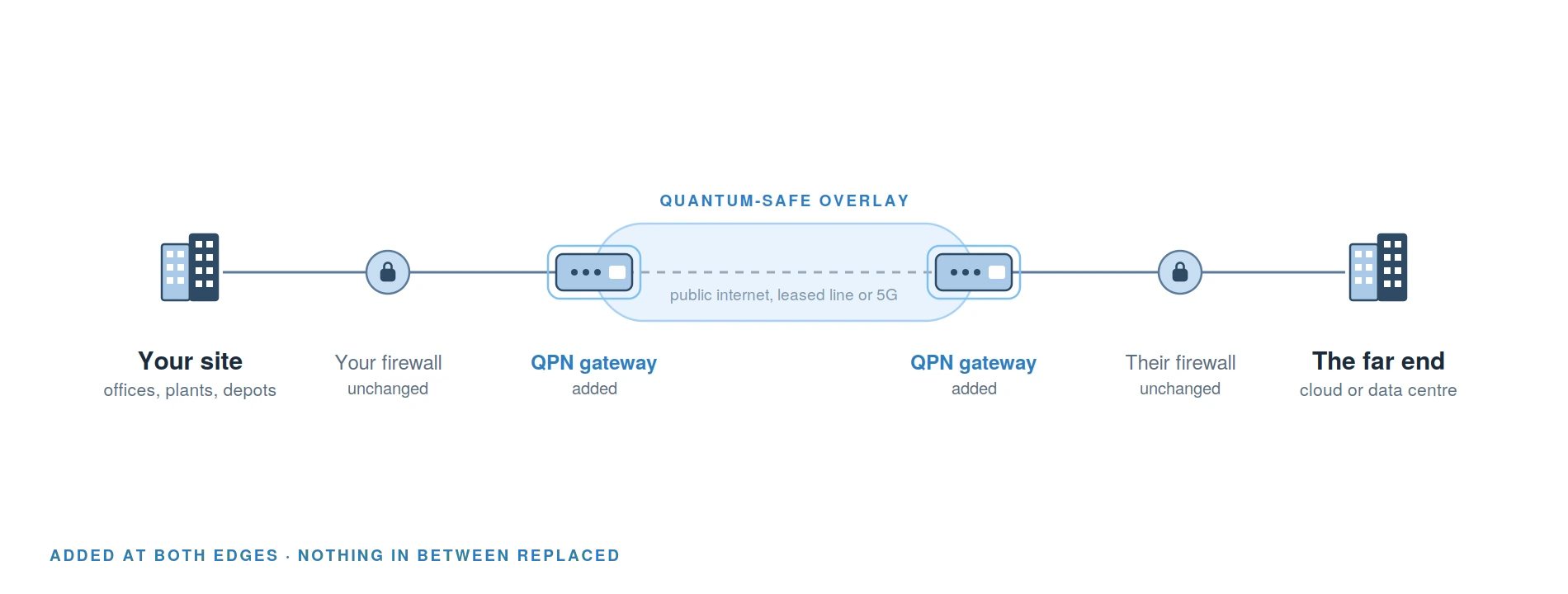
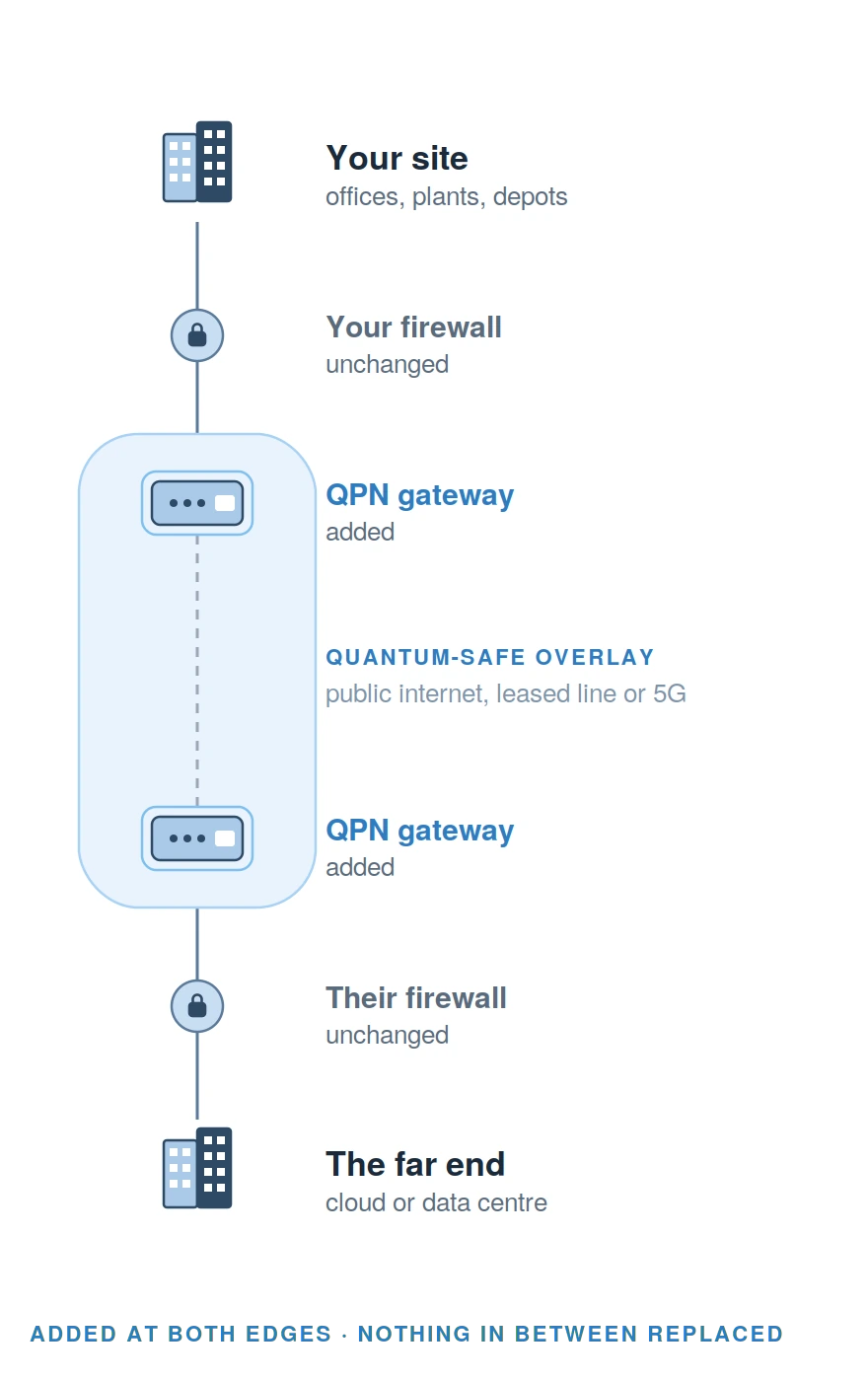
Your central firewall stays
It keeps doing deep packet inspection, anti-virus and the advanced features you bought it for, on the unencrypted side of the gateway. QPN works alongside your firewall rather than replacing it.
Your old boxes stay
Equipment too old for your vendor’s newest firmware can sit behind a QPN gateway and still become quantum-safe. You do not replace the box.
Your edge gets simpler
At remote sites, IoT locations and home offices the gateway can take the place of an existing small firewall. Web filtering, email malware scanning and anti-virus stay on your central firewall.
02 · Why the timing matters
Protect what your equipment sends today, without waiting to replace it.
QPN does the public key exchange with quantum-resistant mathematics, so traffic protected from today stays protected against being broken later by a quantum computer. That matters most for data that stays relevant for years.
Legacy protocols are the second half of the problem. MQTT, TLS and others cannot all be replaced in time, and the products you buy today are expected to still be in service when quantum computers become relevant.
A gateway in front of that equipment protects the traffic without touching the equipment. That buys you time in the migration to quantum-safe protocols and applications.
03 · The boundary
Your data is protected in transit. Your existing security keeps guarding the inside.
It protects the connection. It does not clean up what is already inside your network. Knowing that line precisely is what makes the rest of this page reliable.
By default the gateway also allows outgoing internet access alongside the encrypted connections, because most environments need it for DNS and updates. A firewall policy switches that off for a site that should have no unencrypted path out. Until you do, that traffic relies on application level encryption, so closing it is a deliberate decision.
Keep your firewall. Add quantum-safe protection to the connections that matter.
Quantum Gateway adds a dedicated encryption layer to your existing network. It protects critical connections without a network redesign.
Keep the infrastructure you already trust. Add protection for the quantum era.
Configure now04 · The key exchange
Every session is protected by two independent handshakes. See each step.
Two endpoints connecting for the first time follow this procedure, and repeat it on a two minute timer for as long as the tunnel exists.
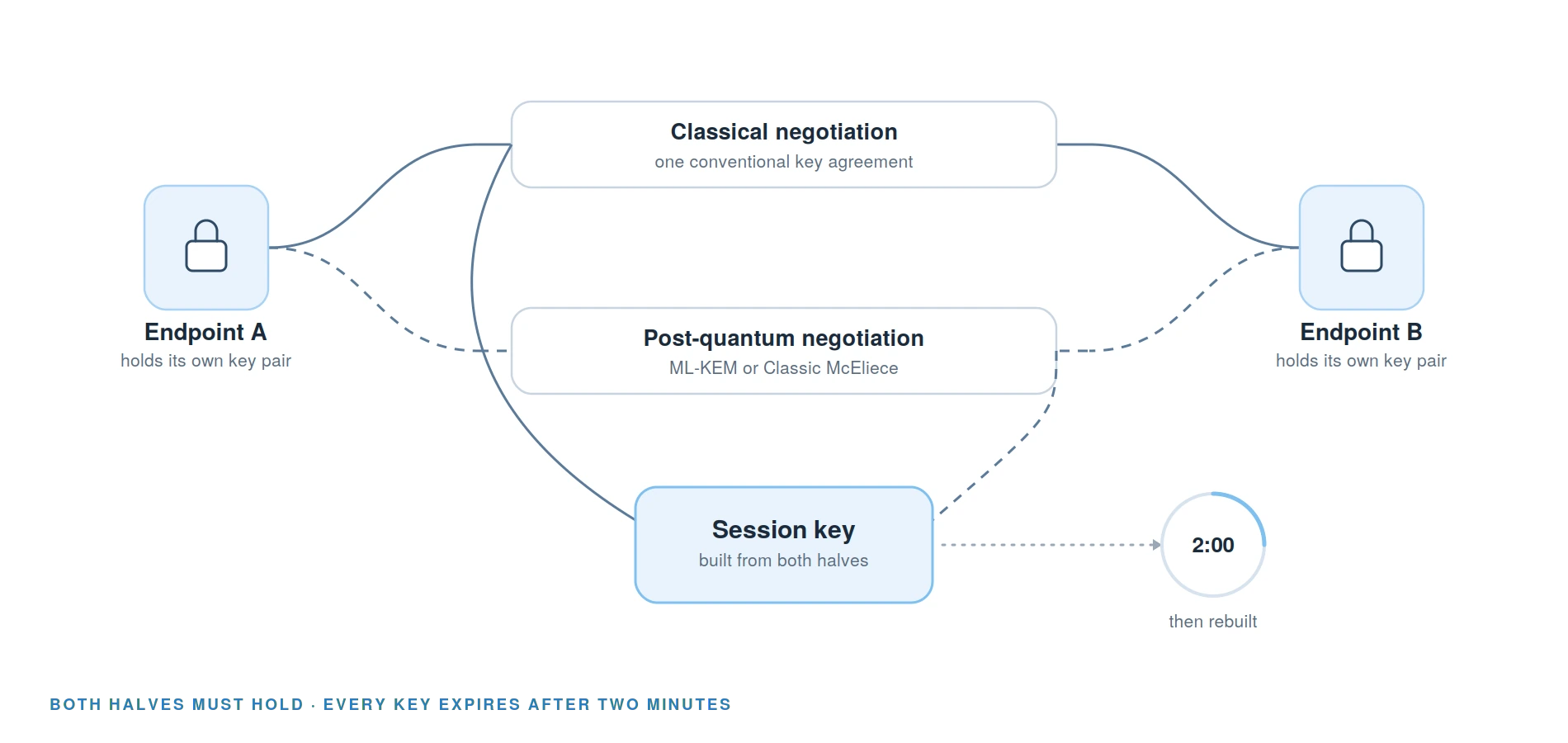
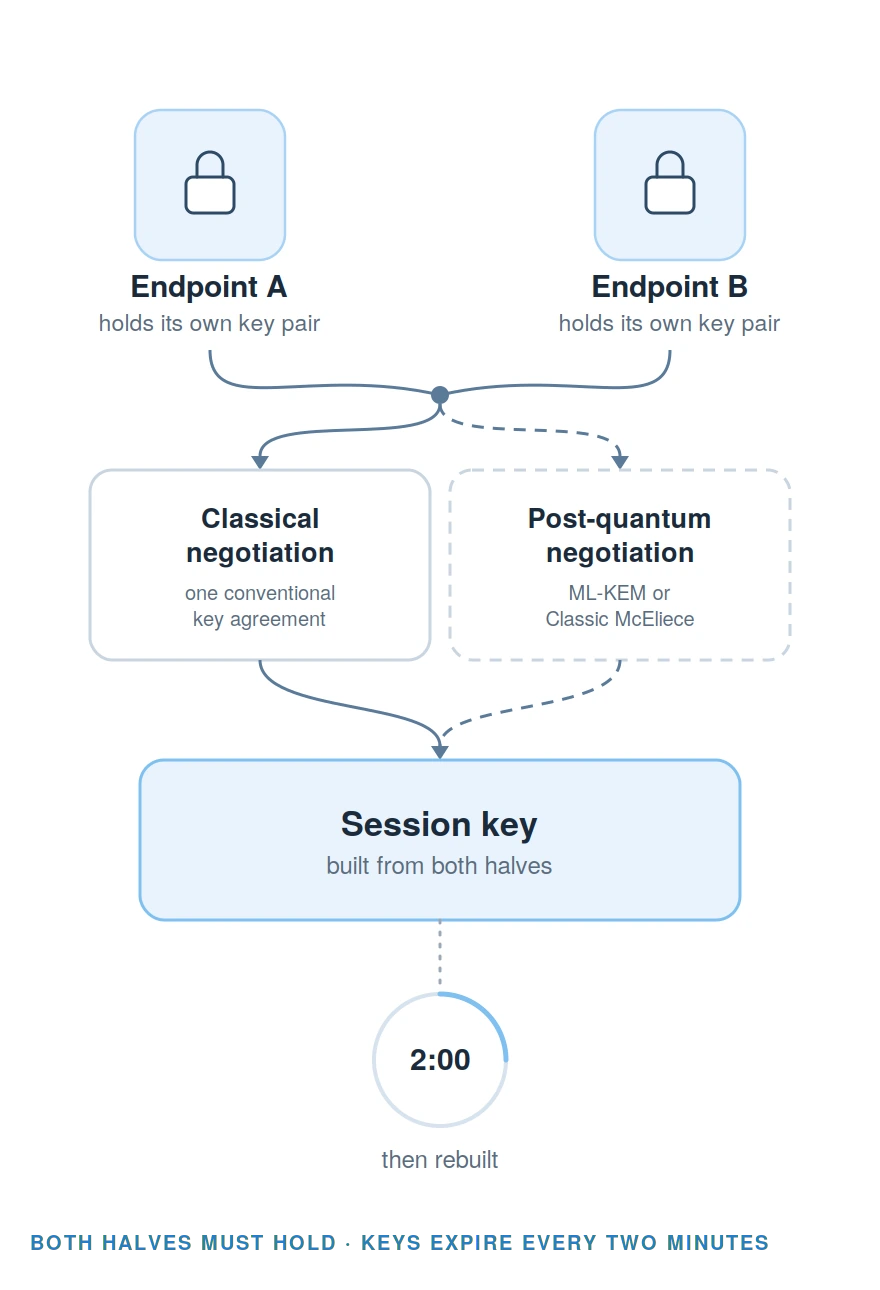
Each endpoint holds a post-quantum key pair. The handshake requires public and private post-quantum keys, for example with ML-KEM or Classic McEliece.
The key agreement is hybrid. It combines a classical part and a post-quantum part. Neither half on its own produces a usable session key.
No valid quantum key exchange, no connection. Without a valid quantum public key exchange during setup and a regular valid quantum session key exchange, the connection cannot be established.
The handshake repeats on a two minute timer. The tunnel keeps running while the key underneath it is replaced. Without a valid post-quantum session key the connection does not work at all.
Without a valid quantum public key exchange during setup and a regular valid quantum session key exchange, the connection cannot be established.
05 · Algorithms and agility
Switch algorithms when standards change, without replacing hardware.
| Algorithm | Status | Availability |
|---|---|---|
| ML-KEM | NIST standardised | In the standard product |
| Classic McEliece | ISO standardised | In the standard product |
| FrodoKEM and other non-standardised options | Not standardised | On request, subject to approval and export rules |
Adopting a new algorithm
It is a configuration change, because the algorithm is already in the product. New algorithms arrive as firmware updates, which come with an active subscription. Without one the gateway keeps running, but stops receiving maintenance and security updates, and you choose from what is in the product.
What the switch costs you
Today a switch done by hand costs up to two minutes of service interruption per site, or a few seconds through the command line.
FIPS-203 and ISO standardise the algorithms. They are not statements about this product, and nothing on this page should be read as a product certification.
06 · What it costs your network
Quantum-safe protection at up to 1 Gbit/s per physical gateway.
Measured between two cloud data centres on opposite sides of the Atlantic, roughly 7,500 kilometres apart, over ordinary public internet with no managed network service. One end was a two-core virtual machine.
~1%
Performance penalty
About 1 percent overhead at MTU 9000, about 5 percent at MTU 1500, typical. It depends on MTU size and the environment, for example NAT.
0.115 ms
Latency added
0.558 ms on the encrypted interface against 0.443 ms without, averaged across a throughput ramp. This is one long-distance cloud to cloud measurement, not a performance guide for the gateway. Latency varies with load and distance.
Up to 1 Gbit/s
Per physical gateway
Up to 1 Gbit/s on a physical gateway. The same software handles up to 10 Gbit/s on a virtual one, given enough CPU cores. That ceiling came from the virtual machine, not the software.
Encryption runs as a kernel process and spreads evenly across all available CPU cores. It does not rely on hardware accelerators or specific CPU instruction sets. Real throughput depends on MTU size, virtualisation environment and network congestion.
07 · Where it runs
Runs wherever your network runs, even with no internet connection.
QPN is a software solution, so it runs as a virtual gateway on a supported Linux platform, in your own environment. Physical gateways are available as well, optionally with a connection profile loaded in the factory, and ARM and RISC builds exist for integration work such as cameras, vehicles and defence equipment. They are handled as a project, not as an order option.
A QPN needs at least two endpoints, and one of them needs a fixed IP address.
Cloud and multi-cloud
End-to-end protection of data flows into virtual private clouds, so you can run a multi-cloud strategy with little or no dependency on the cloud provider’s access methods.
Offline, OT and remote
Physical and virtual gateways in private clouds, private networks and offline environments, with specific support for OT. LEO satellite such as Starlink or IRIS2, mobile connections such as 5G and LTE, and any standard IP connectivity cover remote locations. Carrier grade NAT is not supported.
No telemetry
No telemetry data is exchanged with the manufacturer. You keep full control and no dependency on third party cloud services.
08 · From order to live
Live in about 30 minutes per site, with little or no downtime.
Enterprise customers with network admins usually do this themselves. Smaller sites can get a factory-loaded connection profile or hands-on assistance.
| Stage | Who | What happens |
|---|---|---|
| Pre-configuration | Us | Factory pre-configuration is optional. It is possible once it is known what the gateway will connect to, for example a virtual gateway that is already running. |
| What arrives | Us | The gateway, an external power supply with a country-specific cable, a Quick Install Guide and two LAN cables. Enough for most standard installs. |
| Physical install | You | Place the gateway near network and power, connect the EXT port to your internet router or switch, connect a laptop to the MGT port and open the web UI. About thirty minutes per gateway: install, basic setup, first connections. You need a laptop with a LAN cable, a current browser and a clear picture of your network and IP addresses. |
| Confirming it works | You | The connection state shows in the web UI, and a green QPN LED lights up on the front panel on the first successful connection. |
| Rolling out clients | You | Clients for current Windows and macOS download from the gateway web interface. |
Best case
The cloud gateway and the routing come first, in your own data centre or cloud, through the same interface as the gateways at your sites.
Realistically
A few days depending on your team’s skill set.
Downtime per site
Downtime is only needed when the gateway replaces equipment that requires reconfiguring networks or clients. Then it is typically a few minutes.
09 · The appliance
A compact, fanless appliance with DIN rail, wall and VESA mounting.
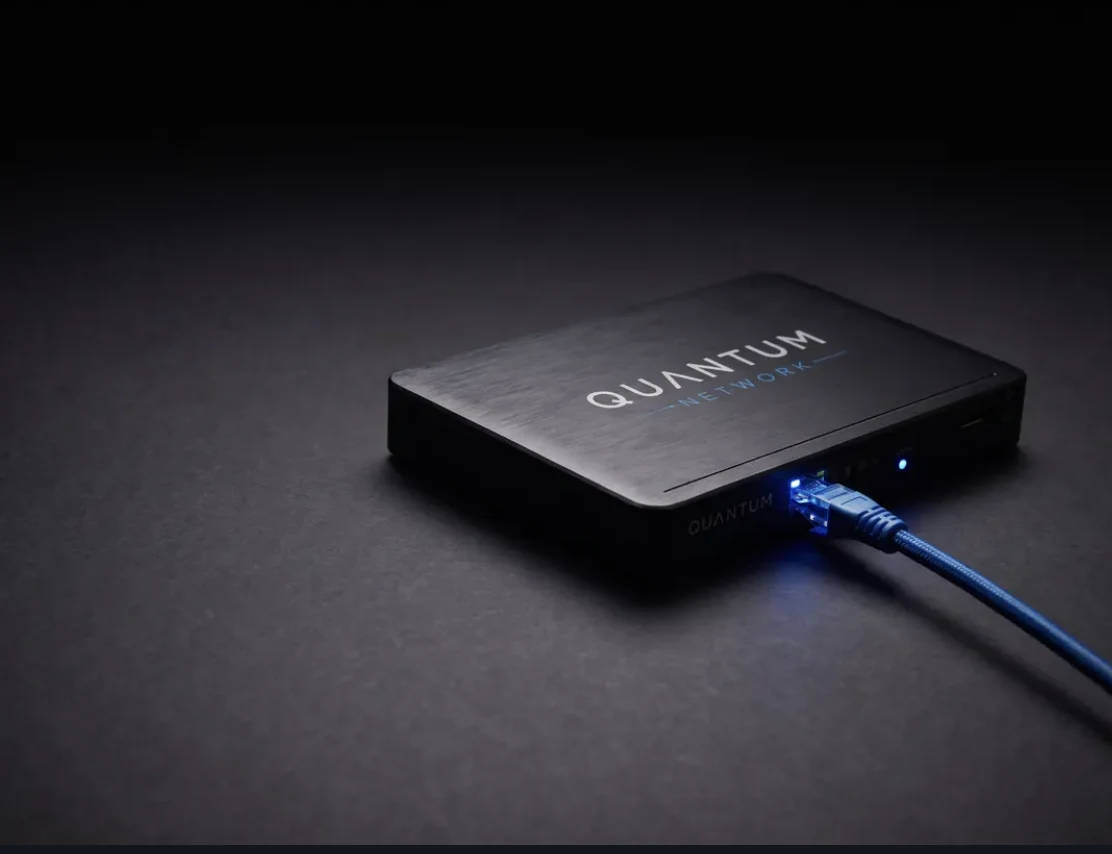
| Platform | Industry-standard x86 appliance. The same software also runs as a virtual gateway on a virtual machine in your own data centre or cloud. |
| Network ports | Four LAN ports, factory-configured as EXT, INT, DHCP and MGT for different use cases and environments. |
| Cooling | Fanless and energy-efficient. |
| Operating temperature | 0 to 40 °C. Do not block the vents. |
| Operating humidity | 5 to 85 percent relative humidity at 40 °C, non-condensing. |
| Storage temperature | −40 to 85 °C. |
| Mounting | Rubber feet for flat surfaces, with wall, VESA and DIN-rail mounting options. |
| Power | Universal power supply, fitted with power cords for the country of installation and for data centre environments. |
| Optional radio | An optional LTE card for an automatic backup path. An optional Wi-Fi card for a hotspot behind the gateway. Specified per device when you order. |
| Clients | QPN clients for Windows and macOS are included. |
Upgrade to quantum-safe protection
See which gateways you need and where they go, in a few questions.
Answer a few questions about your locations and connections. You see an indicative configuration straight away: which gateways, and where they sit in your existing network.
Manage risk. Reduce your exposure.
No contact details needed to see your configuration.
Rather talk it through? Book a 30-minute call